Using Forms in the Process
Robusta allows forms to be integrated into processes through two primary methods: by defining them within a User Task activity or a Start Event activity. This document outlines how to configure and utilize forms in both scenarios.
Calling a Form with the User Task Activity
Activities > User Task



| Element | Description |
|---|---|
| Assigned to process initiator | The form is assigned to the user who initiated the process. |
| Assigned to single user | The form is sent to a single selected user. The relevant user is chosen from the search field. |
| Candidate Users | The form is assigned to multiple selected users. |
| Candidate Groups | The form is assigned to multiple selected groups and their members. |
The users assigned to the form must belong to the same tenant.
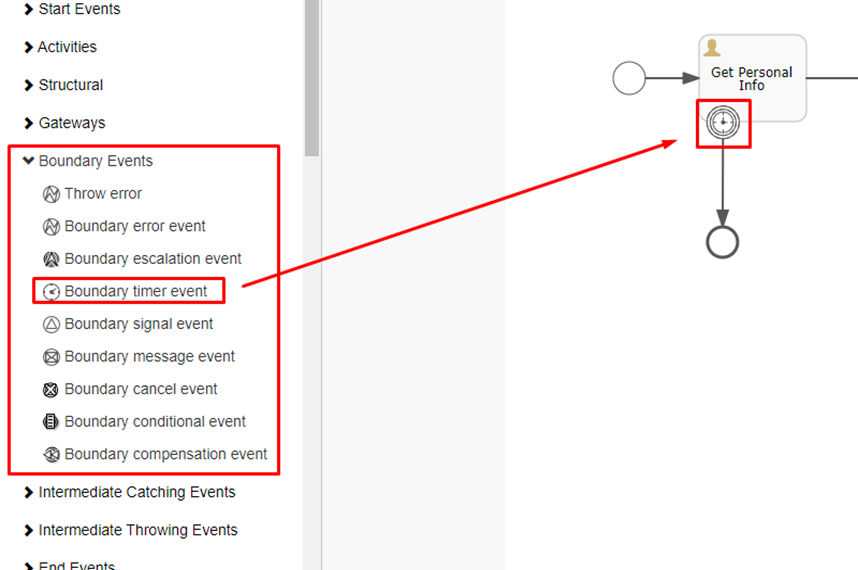
The User Task activity does not inherently include a timeout period and will wait indefinitely for action. To prevent this, a Boundary Timer Event activity can be utilized.
To configure a timeout, enter a duration in the Time duration field and check the Cancel activity box. If the form is not completed within the specified period, the process will be terminated.
Calling a Form with the Start Event Activity
Start Events > Start Event


This feature allows parameters to be passed at the beginning of a process. When the process is scheduled, the form can be completed via the Scheduler, and the entered information will be sent to the process.