Chatbot
The Chatbot feature in Robusta Orchestrator enables users to define, train, and manage conversational AI models. This section guides you through creating a chatbot model by configuring its core components such as intents, entities, and utterances.
Key Concepts
Projects

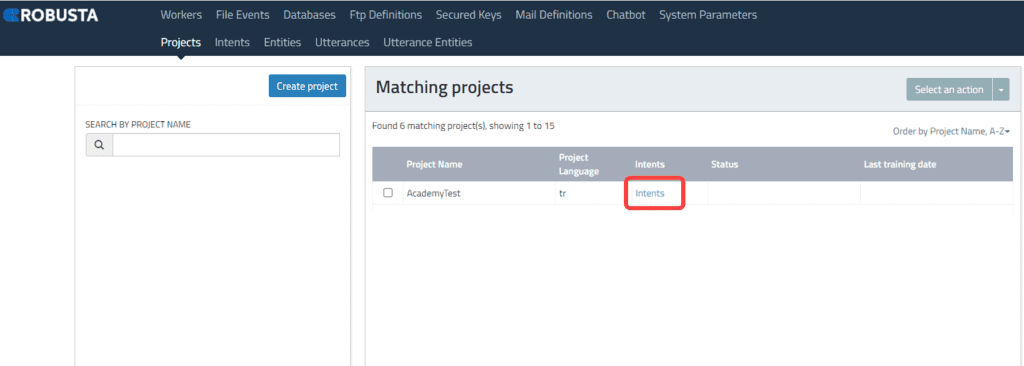




A project refers to the development environment for a chatbot. It encompasses the chatbot's features, usage scenarios, data collection and processing, and training data.
Intent
Intent represents the underlying purpose or desire in a user's expression. Chatbots use intent analysis to understand the user's goal. For example, a user wanting to make a restaurant reservation would have the intent "make a reservation."
Entity
An entity is a specific piece of information associated with an intent. It represents important details within a user's expression related to a specific topic or category. In the restaurant reservation example, details such as "reservation date" or "number of people" are considered entities.
Utterances
Utterances are the specific phrases or sentences users employ to communicate with the bot. The bot analyzes these utterances using intent and entity recognition to provide an appropriate response. For instance, "I want to book a table for tomorrow evening" is an utterance that the bot analyzes for intent and entities.
Utterance Entities
Utterance entities are specific elements within user expressions that represent key information. The bot recognizes these entities by extracting relevant details. For example, in a user's statement "I want to book a table for Tuesday," "Tuesday" represents an entity indicating the reservation date.
Model Creation
The creation and training of a model are essential for the chatbot to understand user inputs and generate accurate responses. The model's language understanding capabilities are developed using the defined intents, entities, and utterances.


This document provides an explanation through an example using a Reservation Creation Chatbot model.
- To add intents to the created project, click on the 'intents' text on the project line.
- Enter the intent name in the 'Name' field.
- Enter the intent description in the 'Description' field.
- After creating the intent, click on 'Entities' under Intent to specify the entities.
- Enter the entity name in the 'Name' field.
- Select the entity type in the 'Entity Type' field.
- After creating entities, click on 'Utterances' under Intent to specify utterances.
- To create utterances, press the 'Create Utterance' button.
- To create entities for Utterances, click on 'Entities' under Utterance.
- To create an utterance entity, press the 'Add entity' button.
- Enter the entity name in the 'Name' field.
- Select the entity type in the 'Entity Type' field.
Each entity contained within each utterance should be entered separately.
- After entering sufficient data, return to the Project screen.
- Select the project and press 'Train Model' to train the project.