Mail definitions
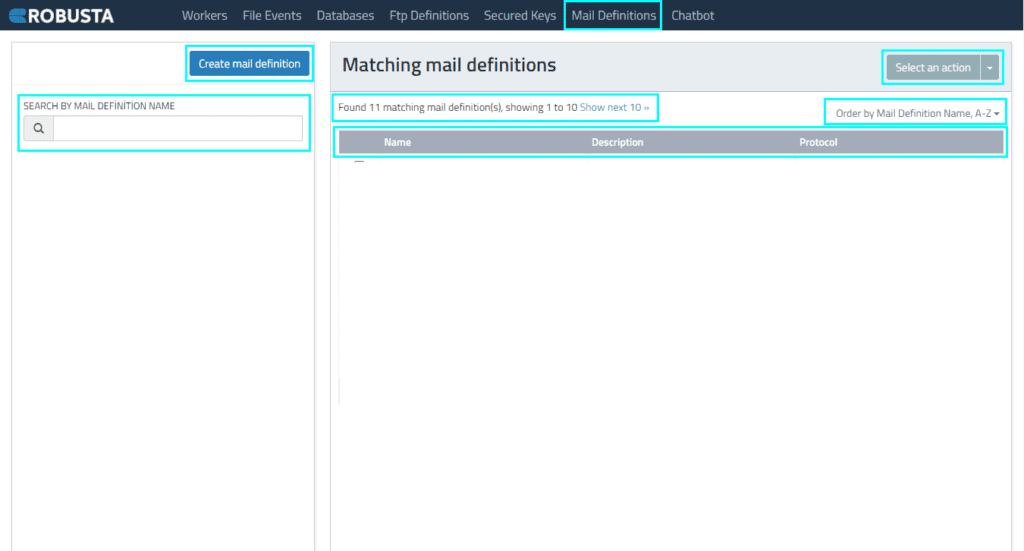
The Mail Definitions interface allows you to configure authorized username and protocol information (IMAP, POP3, EXCHANGE, SMTP) for sending and receiving emails within processes. This enables the creation of global, environment-independent mail definitions.
| Element | Description |
|---|---|
| Create Mail Definition | Access the mail definition creation field. |
| Select Action | Perform actions on selected mail definitions, such as deleting, changing details, or defining a new FTP event. |
| Search by Mail Definition Name | Find mail definitions on the list by name. |
| Show Next 10 | Display additional mail definitions in batches of 10. |
| Order by Mail Definition Name | Sort mail definitions by their name. |
| Name | The name of the mail definition. |
| Description | A description of the mail definition. |
| Protocol | The protocol information for the mail definition. |
Creating a Mail Definition
Clicking the Create Mail Definition button allows you to define a new mail identifier and configure its properties. The following fields are available:
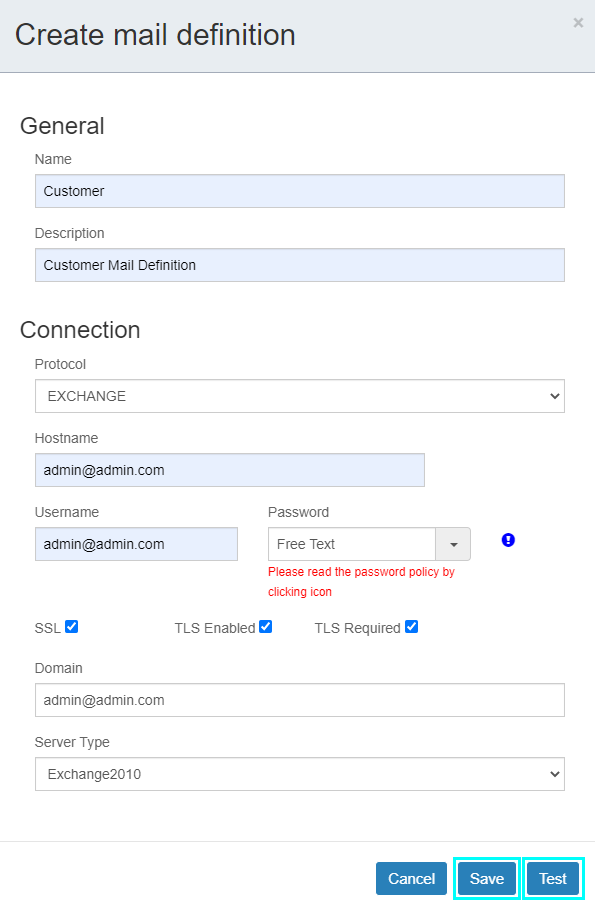
Mail Definition Fields
| Element | Description |
|---|---|
| Name | The name of the mail definition. |
| Description | A description of the mail definition. |
| Protocol | The mail protocol information. IMAP, POP3, EXCHANGE, and SMTP protocols are supported. |
| Hostname | The mail server name. |
| Username | The mail username. |
| Password | The mail password. |
| SSL, TLS Enabled, TLS Required | Select SSL, TLS, or TLS Required based on security needs. |
| Domain | The domain information. |
| Server Type | The type of server. |
Adding a Mail Event
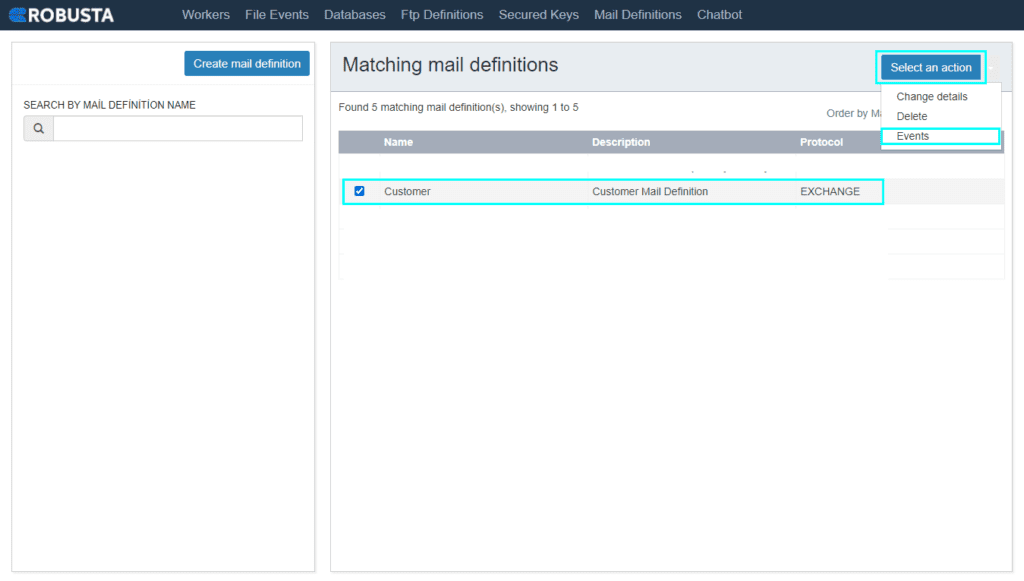
After creating a mail definition, click the Select an action button and choose Events to add an event listener.
Event listener definitions are configured using either PRE-CONDITION or TRIGGER options. While some fields are similar, their functionalities differ and are detailed below.
Pre-Condition Event Fields
| Element | Description |
|---|---|
| Saved Events | Select a previously defined event from the list. If the list is empty, no events have been defined. |
| Enable | Determines whether the Mail Event will be active. If selected, the event becomes active. |
| Name | The name of the mail event. |
| Action Type | Determines the Mail Event operation type. PRE-CONDITION is selected if the Mail Event must work under a certain condition. TRIGGER is selected only if it will listen for any changes in the folder and trigger a process to run. |
| Folder | The name of the mailbox folder to monitor. Use the name displayed in the mail interface (e.g., "Inbox"). |
| Only Unread | Only unread emails are considered. |
| Mark as Read | Marks unread emails as read after processing. |
| Order | Specifies the order in which emails should be read: from newest to oldest or oldest to newest. |
| Trigger Mode | "Trigger all in one" refers to activating multiple triggers simultaneously or collectively, while "Trigger one by one" means activating each trigger separately, in a sequential order. |
| From | Information about the sender of the mail. |
| To | Information about the recipient of the mail. |
| Subject | The subject of the mail. |
| Newer Than (seconds) | Controls the mailbox periodically based on the Check interval (seconds) field. If mail that is sent from the email address defined in the To field with the subject is newer than the seconds in the Check interval (seconds) field, it is a pre-condition to start an event. |
Trigger Event Fields
| Element | Description |
|---|---|
| Saved Events | Select a previously defined event from the list. If the list is empty, no events have been defined. |
| Enable | Determines whether the Mail Event will be active. If selected, the event becomes active. |
| Name | The name of the mail event. |
| Action Type | Determines the Mail Event operation type. PRE-CONDITION is selected if the Mail Event must work under a certain condition. TRIGGER is selected only if it will listen for any changes in the folder and trigger a process to run. |
| Folder | The name of the mailbox folder to monitor. Use the name displayed in the mail interface (e.g., "Inbox"). |
| Only Unread | Only unread emails are considered. |
| Mark as Read | Marks unread emails as read after processing. |
| Check Interval (seconds) | The interval, in seconds, at which the mailbox will be checked. |
| Process | The process that will be triggered. |
| Parameters | The parameters for the triggered process. |
| Worker | The worker on which the mail event will be executed. |
| From | Information about the sender of the mail. Multiple values can be entered. |
| To | Information about the recipient of the mail. Multiple values can be entered. |
| Subject | The subject of the mail. Multiple values can be entered. |
| Newer Than (seconds) | Controls the mailbox periodically based on the Check interval (seconds) field. If mail that is sent from the email address defined in the To field with the subject is newer than the seconds in the Check interval (seconds) field, it triggers the event. |