Run cmd
Run cmd activity allows run every command and program executed via Cmd.
| * Exe name | The program name typed on the command line using CMD commands. |
| *Working directory | CMD is the working directory of the program where the command will be run. |
| Wait until finish | It is specified whether the process will be suspended until the end of the CMD command. If True is selected, the process waits in the relevant step until the program is terminated, if False is selected, the process goes to the next step without waiting for the program to end. |
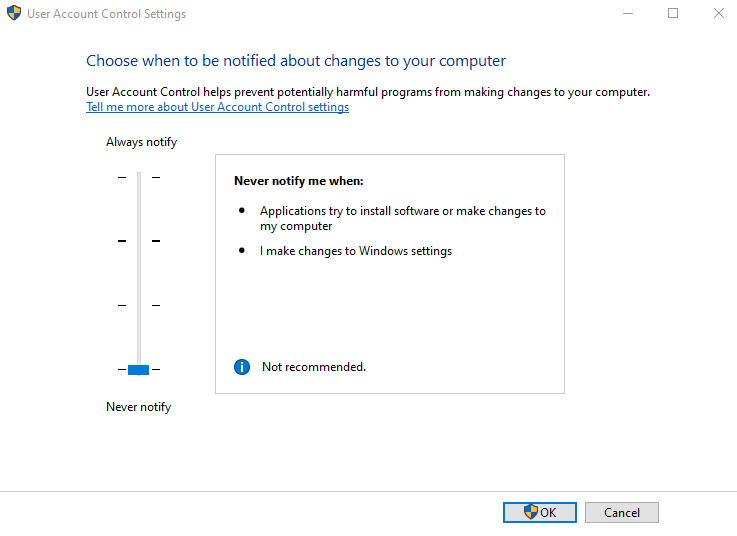
| Run as admin | When this field is checked, the program will be run as admin. Note: User Account Control Settings should be at the minimum level (Never notify). |
| Parameters | The parameters of the program. |
| Result variable | Result variable name. |
Note: * Fields selected with are required, others are optional.
Exe name example
You can use the Exe name as shown in the example.
QAD.Applications.exe
cmd.exe
Working directory example
You can use the Working directory as shown in the example.
C:\Temp
C:\ebyn
Wait until finish example
You can use the Wait until finish as shown in the example.
If True is selected, the process waits in the relevant step until the program is terminated, if False is selected, the process goes to the next step without waiting for the program to end.
Parameters example
You can use the Parameters shown in the example.
MD Trial
C:\ebynbdp.bat
Run as admin
User Account Control Settings should be at the minimum level (Never notify).