List files
List files activity is used for listing file/folder names in folder.
| *Directory name | The file name or the folder name is written. |
| **Dataset name* | The reference name is given to the dataset which will create in this field. |
Note: * Fields selected with are required, others are optional.
Directory name example
You can use the Directory name as shown in the example.
C:\Temp\Test
Dataset name examples
You can use the Dataset name as shown in the example.
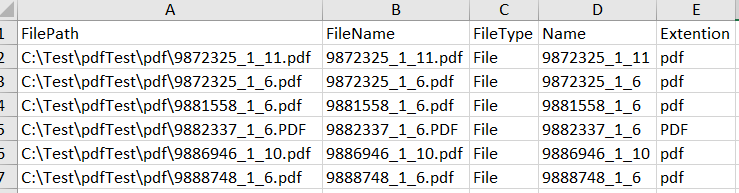
Dataset transferred file and folder names form 5 columns.
Folder/file full directory in column A:
C:\Temp\deneme or
C:Temp\test.xlsx
Folder/file name in column B:
test or
text.xlsx
If the folder name is taken in the C column, it is written as “Directory”, if the file name is taken, it is written as “File”.
The resulting dataset appears as follows when excelling Excel. Without excel, the rows of the list in the data set can be taken in the loop.