Create and Import Tables
- Click on one of the decision table creation buttons marked below on the Decision Tables tab.
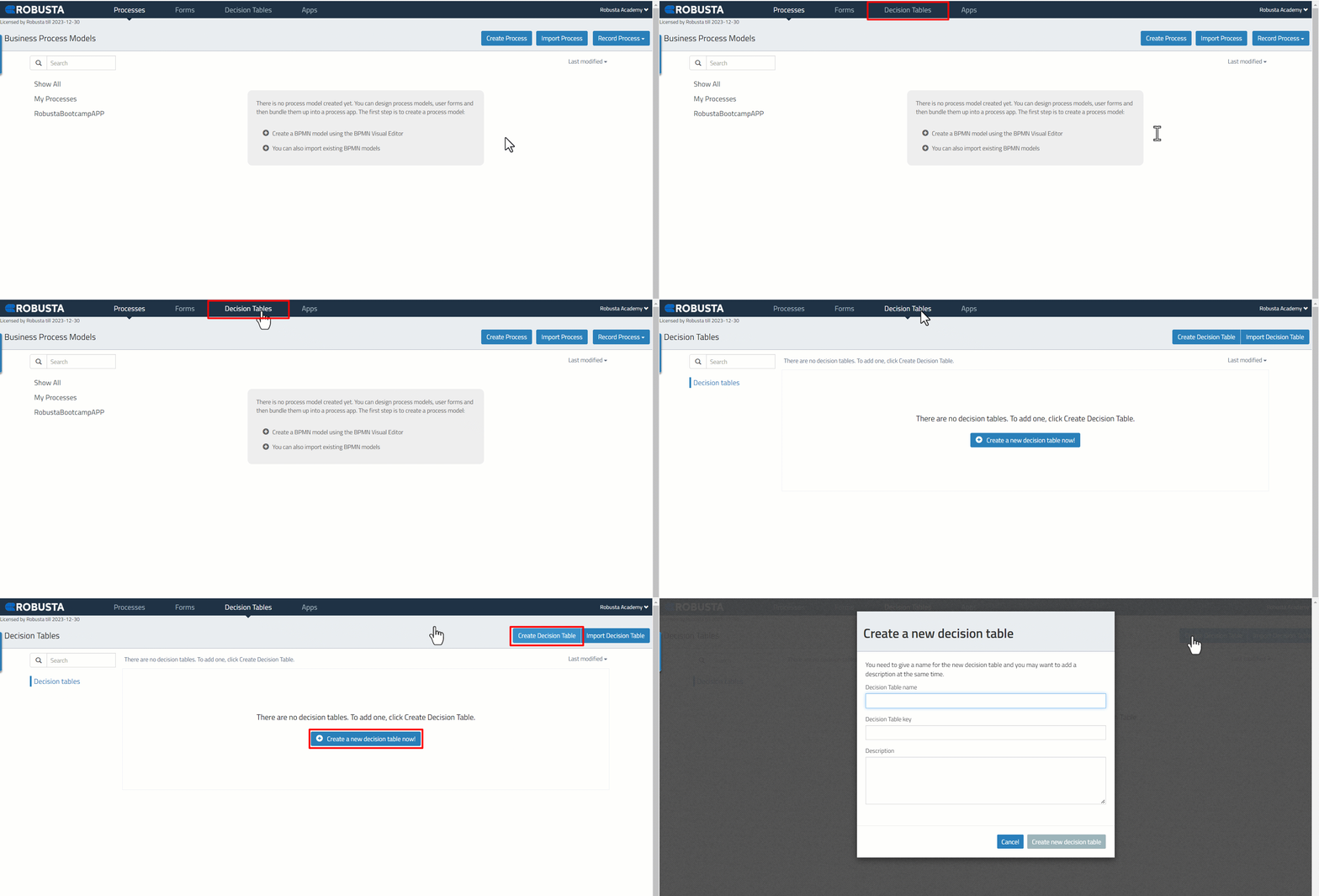
- The “Decision Table Name” and “Decision Table Key” fields of the Decision Table are given in the marked fields. “Decision Table Key” must be unique and must be given by paying attention to variable naming conventions.
/assets/images/056167c20d39ff34fb060c3579060aa2.gif
| * Decision table name | The visible name of the decision table. Spaces can be used. |
| * Decision table key | The technical name of the decision table. Spaces cannot be used. |
| Description | The description of the model. Used for documentation. |
A Decision Table that has been created and saved in “dmn” format can be added to the “Decision Tables” interface with the import field.
- Click the “Import Decision Table” button to add an existing decision table to the Decision tables interface,
/assets/images/7706d6c2da24ff6bd30aa85c52d6b37d.gif
- Click the “Choose File” button to select the .dnm file where it is located.
/assets/images/2e7ff5fa0442f4bcb20fae686560f564.png
- The added decision table is displayed in the “Decision Tables” interface.
/assets/images/b88aadf7fe64f2840ba57bf103e5591d.png