File Events
File Events area starts a new process according to operation status such as adding the specific folder to the relevant file, deleting or editing and defines a certain condition for process whose runtime is due. Server where orchestrator is installed must have folders, shared and public folders that server can access.
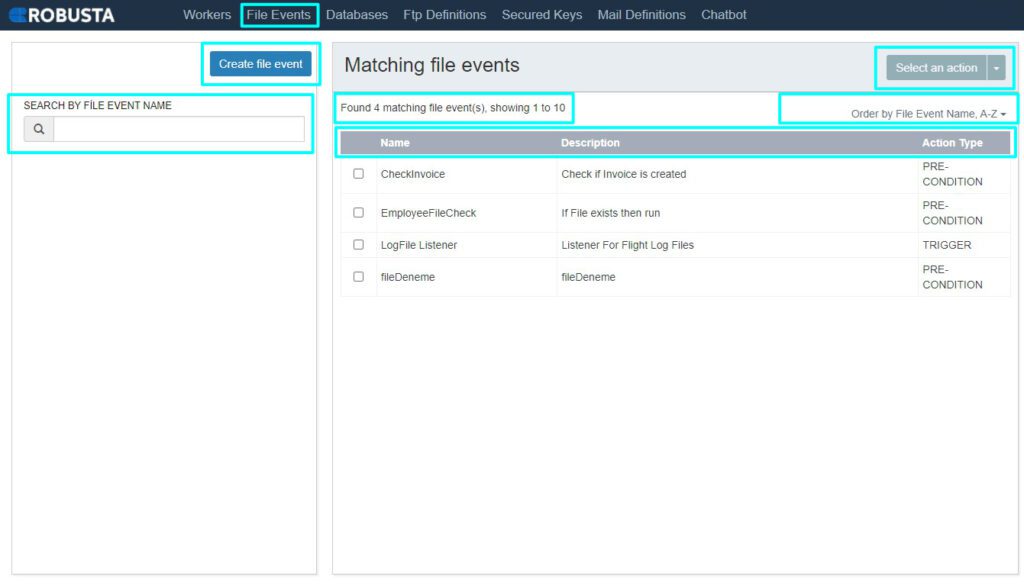
| Create file event | Access file event creation field through this button. |
| Select an action | Selected file events can be deleted or their details can changed. |
| Search by file event name | File events on the list can be found via this field. |
| Show next 10 | By clicking can show all file events by 10. |
| Order by file event name | Orders workers by worker name. |
| Name | Name of worker. |
| Description | Description of file event. |
| Action type | File Event operation type is determined. If File Event has to work under a condition, PRE-CONDITION; TRIGGER is selected only if it will listen for any changes in the folder and trigger a process to run. |
To create a file event, click Create file event button and fill in the relevant field. There are two options to create an event; Pre-Conditions and Trigger. Pre-Condition means a process can only be run when the described condition would be provided. On the other hand, Trigger means a described situation occurs or not, then determined process run. Trigger option always listens the described directory without allocate any robot. Click Save button to close the window.
| Name | Name that will be given to file event. |
| Description | Description of file event. |
| Enable | Determine whether File Event will be active / running. If Enable is selected, the event becomes active. |
| Path | The directory in which the folder that will be listened is given. |
| Filename | The file name to be listened to is given with its extension. This field is not mandatory but optional. (Ex: *. , Report _ * .txt etc. The file name can also be given using REGEX statements.) |
| Action type | File Event operation type is determined. If File Event has to work under a condition, PRE-CONDITION; TRIGGER is selected only if it will listen for any changes in the folder and trigger a process to run. |
| Event type | Which changes file event will listen or under which condition file event will work. For TRIGGER, event types are FILE ADDED, FILE REMOVED and FILE CHANGED. For PRE-CONDITION, event type is EXIST. |
| Process | Process that will run for file event. Only in TRIGGER . |
| Parameters | Parameters of file event. |
| Worker | Worker that will run for file event. Only in TRIGGER . |