Mail definitions
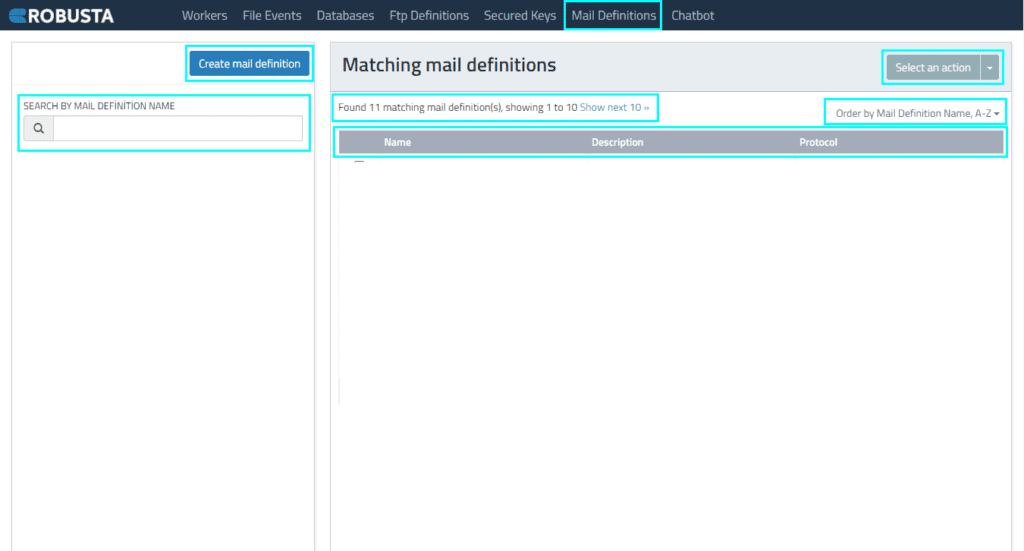
Mail definitions is an interface where authorized username and protocol information like IMAP, POP3, EXCHANGE and SMTP is defined to read, send mail et. within process. It enables mail definitions to be made globally and to use these environment-independent definitions.
| Create mail definition | Access mail definition creation field through this button. |
| Select an action | Selected mail definitions can be deleted, their details can be changed or a new ftp event can be defined. |
| Search by mail definition name | Mail definitions on the list can be found via this field. |
| Show next 10 | By clicking can show all mail definitions by 10. |
| Order by Mail Definition Name | Orders mail definitions by mail definitions name. |
| Name | Name of mail definition. |
| Description | Description of mail definition. |
| Protocol | Protocol information of mail definition. |
By clicking the Create Mail Definition button, a mail identifier and a mail event listener are created. You can see the previously created Mail Event definitions in the image below and enter mail definitions into the relevant fields.
| Name | Name of mail definition. |
| Description | Description of name. |
| Protocol | Mail Protocol information. IMAP, POP3, EXCHANGE, SMTP protocols are supported. |
| Hostname | Mail server name. |
| Username | Mail username information. |
| Password | Mail password information. |
| SSL,TLS Enables, TLS Required | SSL, TLS is selected according to the requirement. |
| Domain | Domain information. |
| Server Type | Type of server. |
After mail definition is made, click Select an action button and choose Events to add event.
Fill in the fields to make an event listener definition. Although the fields for PRE-CONDITION and TRIGGER options are similar, there are differences, they will be displayed separately.
PRE-CONDITION
| Saved events | If you want to use “event” defined before, it is selected from the list. If the list is empty, it means there is no “event” defined before. |
| Enable | It is determined whether the Mail Event will be active/working. If Enable is selected, the event becomes active. |
| Name | Name of mail event. |
| Action type | Mail Event operation type is determined. If Maill Event has to work under a certain condition, PRE-CONDITION; TRIGGER is selected only if it will listen for any changes in the folder and trigger a process to run. |
| Folder | The folder name you want to rest is written in the mailbox. The name displayed in the mail interface is taken as basis. (Eg: A Turkish mail interface is written as “Inbox” and an English mail interface is written as “Inbox”.) |
| Only unread | Only unread mails are taken as basis. |
| Mark as read | Mark unread mails as read. |
| From newest to oldest – oldest to newest | The order in which emails should be read can be selected. |
| Trigger one by one – all in one | “Trigger all in one” refers to activating multiple triggers simultaneously or collectively, while “Trigger one by one” means activating each trigger separately, in a sequential order. |
| From | The information about who will send the mail. |
| To | The information to whom the mail will be sent. |
| Subject | The subject of the mail. |
| Newer than(seconds) | Controls mailbox periodically based on the Check interval(seconds) field . If mail that is sent from email address that is defined in the To field with the subject is newer than seconds in the Check interval(seconds) field , it is pre-condition to start an event. |
TRIGGER
| Saved events | If you want to use “event” defined before, it is selected from the list. If the list is empty, it means there is no “event” defined before. |
| Enable | It is determined whether the Mail Event will be active/working. If Enable is selected, the event becomes active. |
| Name | Name of mail event. |
| Action type | Mail Event operation type is determined. If Maill Event has to work under a certain condition, PRE-CONDITION; TRIGGER is selected only if it will listen for any changes in the folder and trigger a process to run. |
| Folder | The folder name you want to rest is written in the mailbox. The name displayed in the mail interface is taken as basis. (Eg: A Turkish mail interface is written as “Inbox” and an English mail interface is written as “Inbox”.) |
| Only unread | Only unread mails are taken as basis. |
| Mark as read | Mark unread mails as read. |
| Check interval(seconds) | How many seconds intervals the control will be made. |
| Process | Process that will be triggered. |
| Parameters | Process parameter that will be triggered. |
| Worker | On which worker mail event will be executed. |
| From | The information about who will send the mail. Multiple values can be entered. |
| To | The information to whom the mail will be sent. Multiple values can be entered. |
| Subject | The subject of the mail. Multiple values can be entered. |
| Newer than(seconds) | Controls mailbox periodically based on the Check interval(seconds) field . If mail that is sent from email address that is defined in the To field with the subject is newer than seconds in the Check interval(seconds) field , it triggers the event. |